
What Is a USB C Bulkhead Connector?
A USB C Bulkhead Connector is a panel-mounted USB-C feed-through. It lets a cable pass through an enclosure wall while keeping the connection accessible from the outside. Picture a sealed equipment cabinet: the connector mounts through its panel, with one USB-C port outside and another inside. The simple appearance can hide important design choices.
USB-IF’s USB4 Version 2.0 announcement specifies signaling rates of up to 80 Gbps, while USB Power Delivery 3.1 supports power profiles up to 240 W. These are protocol capabilities, not promises made by every bulkhead connector. Actual performance depends on the connector, cable assembly, host, and device working together. A data-rated port may not support video or high-wattage charging. Check the product specifications.
USB-IF Executive Director and COO Jeff Ravencraft has described USB Type-C as “a new, smaller, reversible connector that is easy to use.” That idea explains its appeal, but panel installation adds practical concerns: mounting thickness, connector retention, sealing, and strain relief. A loose fitting can wobble when users unplug a cable. Water resistance also cannot be assumed from a metal flange alone.
For engineers and buyers, the useful question is not merely whether a connector fits a USB-C plug. It is whether the complete assembly meets the required data, power, environmental, and service needs. Datasheets help. So do sample tests. Sometimes, the overlooked detail is the one that fails first.
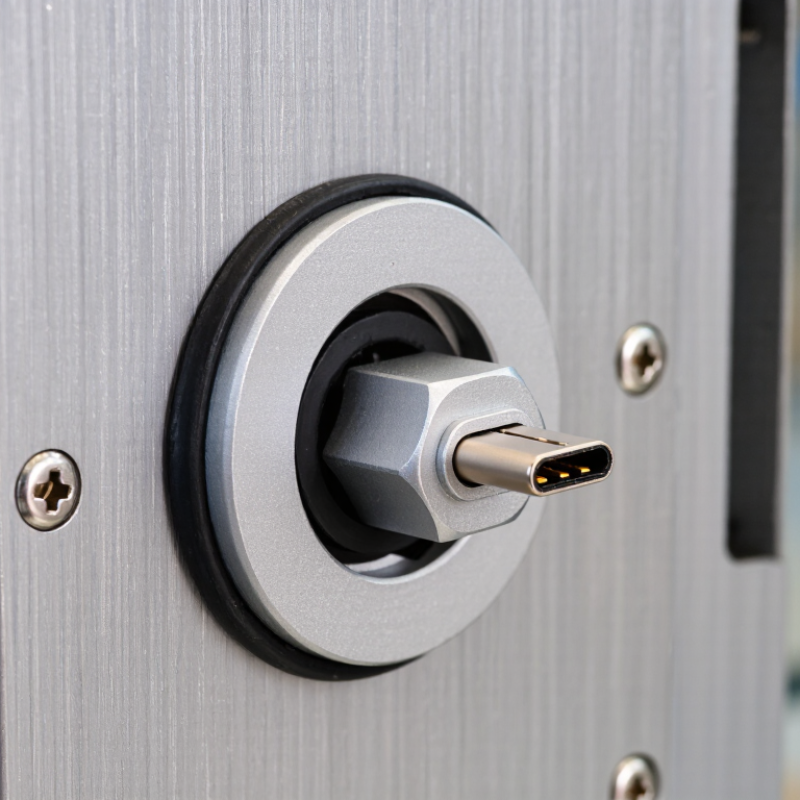
Definition and Purpose of a USB-C Bulkhead Connector
A USB-C bulkhead connector is a panel-mounted socket that carries a USB-C connection through an enclosure wall. It creates an accessible port on equipment such as an instrument case, control cabinet, or vehicle console. Inside, a short cable or connector links the panel socket to the device. The exact design varies: some units are simple pass-throughs, while others include sealed fittings or mounting hardware.
Its purpose is practical. It keeps the device’s internal connection protected while letting users plug in from outside. However, a USB-C shape does not guarantee a particular data speed or charging power. USB-IF’s USB4 Version 2.0 specification describes speeds up to 80 Gbps, while USB Power Delivery 3.1 supports up to 240 W with compatible equipment. A bulkhead assembly must be rated and wired for the intended performance. These figures are capability limits, not promises for every panel port. That distinction is easy to miss.
Tips: Check the connector’s data and power ratings, panel thickness, and sealing method before installation. Leave room behind the panel for the cable’s bend; tight routing can stress the connection. Test the complete assembly, not just the loose connector.
Key Components and Physical Design
A USB-C bulkhead connector is a panel-mounted connection point that lets a cable pass through an enclosure wall. Its visible side is usually a USB-C receptacle surrounded by a metal shell and mounting flange. Behind the panel, a short cable or circuit-board connection carries power and data. USB-IF’s USB Type-C specification defines 24 contacts in the connector; the compact layout makes alignment and solder quality important. Small parts matter. A gasket may sit between the flange and panel, while a threaded collar or screws keep the connector in place. The exact arrangement varies by design.
The physical details affect durability. A thick panel can leave too little thread for secure mounting, while a compressed gasket may distort the connector. Rear strain relief helps prevent cable movement from stressing solder joints. USB-IF’s USB Power Delivery 3.1 specification supports power levels up to 240 W, but a bulkhead assembly must be rated for its intended current and heat conditions; the headline maximum is not a rating for every connector. For environmental sealing, IEC 60529 defines IP protection classifications. Check the complete assembly’s stated rating, not just the receptacle’s appearance. A tight seal can also make replacement harder.
Tips: Measure panel thickness and cutout before ordering. Check gasket compression, rear clearance, and the assembly’s current rating. A neat fit is not always a serviceable one.
USB-C Receptacle Contact Allocation
A full-featured USB-C receptacle has 24 contact positions. The chart groups them by function; actual devices may implement only the functions they support.
How the Connector Transfers Power and Data
What Is a USB C Bulkhead Connector?
How the Connector Transfers Power and Data
A USB-C bulkhead connector mounts through an enclosure wall, creating an accessible port while linking to internal wiring. Power travels through the VBUS and ground contacts; data travels through high-speed differential pairs. The small CC contact also helps connected equipment detect orientation and negotiate supported power. USB-IF’s USB Power Delivery Specification Revision 3.1 allows up to 240 watts, but only with compatible devices, cables, and connectors. A bulkhead does not create that capacity. It must preserve the required electrical path.
Data performance depends on more than matching the plug shape. USB-IF’s USB4 Version 2.0 specification supports signaling rates up to 80 Gbps under suitable configurations. The bulkhead and its internal cable must both support the intended mode. At high rates, contact quality, shielding, cable length, and impedance matter. A loose connection can interrupt data or cause charging to fall back to a lower level. Real installations can be less tidy than drawings suggest. Even a carefully mounted port deserves testing with the actual cable and equipment. Specification numbers describe capability, not a guaranteed result in every enclosure.
Common Types and Technical Specifications
What Is a USB C Bulkhead Connector?
Common Types and Technical Specifications
A USB-C bulkhead connector mounts through an enclosure wall, letting users connect a cable from outside. Most designs have a USB-C receptacle on each side. They create a neat pass-through without leaving a cable permanently attached. A practical choice for equipment panels.
Common types include simple feedthroughs, panel-mount connectors with threaded collars, and sealed versions with gaskets or protective caps. Some use short internal pigtails instead of a direct-through connection. That difference matters: the internal cable can affect signal performance and available space. Measure the panel opening and thickness before ordering; a connector that looks compact may need clearance behind the wall.
Check the supported data protocol, not just the USB-C shape. USB 2.0 supports up to 480 Mbps, while USB 3.2 Gen 1 reaches 5 Gbps under suitable conditions. Higher rates require compatible connector construction, internal wiring, and cables. Power delivery also depends on the complete system, including the source, cable, and device; the receptacle alone does not guarantee a particular wattage. For outdoor or washdown installations, confirm the stated IP rating after mounting. A gasket can compress unevenly. That small detail is easy to overlook.
Applications and Installation Considerations
A USB-C bulkhead connector provides a panel-mounted connection between equipment inside an enclosure and a cable outside it. It is useful on test instruments, control cabinets, vehicle consoles, and portable cases where repeated access is needed without opening the housing. Some assemblies carry power only; others support data or video. Check the connector’s rated functions rather than assuming every USB-C port supports them. A familiar shape can hide different capabilities.
Installation starts with the enclosure, not the connector. Confirm the panel thickness and cutout dimensions against the part drawing, then check that nearby components leave room for the plug and cable bend. A tight fit can stress the port. It can also make a serviceable connection awkward to reach. Secure the connector with its specified hardware, and use the supplied gasket only as directed. A gasket does not make an unsealed assembly waterproof. For vibration-prone equipment, add appropriate cable strain relief so cable movement does not load the connector. After mounting, inspect the internal connection and test power and data functions separately. Small alignment errors are easy to miss. One practical compromise: a recessed port may protect the connector, but can block wider plugs. Check the actual cables before finalizing the panel layout.
What Is a USB C Bulkhead Connector? - Applications and Installation Considerations
| Topic | Typical Details | Applications | Installation Considerations |
|---|---|---|---|
| What it is | A panel-mounted USB Type-C connection that brings a USB-C port through an enclosure wall. Many designs use a short internal cable or a pass-through coupler. | Enclosures, control panels, equipment cabinets, and other installations where a port needs to be accessible from outside. | Check whether the assembly is a passive pass-through or contains active electronics; this affects compatibility and performance. |
| Data capability | Supported speeds depend on the connector, internal cable, host, device, and protocol. USB 2.0 supports up to 480 Mbit/s; USB 3.2 Gen 1 supports up to 5 Gbit/s when the complete link supports it. | Peripheral connections, data access, and service ports on instruments or embedded equipment. | Select a connector and cable rated for the required data rate. Verify the assembled link in the intended configuration, especially for high-speed signals. |
| Power delivery | USB-C describes the connector shape, not a guaranteed power level. USB Power Delivery capability depends on the source, sink, cable, and connector assembly. | Charging or powering equipment through an enclosure-mounted port, where supported by the system. | Confirm voltage, current, and power ratings for every part of the path. Do not assume a bulkhead connector supports a particular USB PD profile. |
| Panel mounting | Mounting styles commonly include threaded bodies with a retaining nut or flange-mounted designs. Cutout size and permitted panel thickness vary by product. | Metal or plastic panels, instrument housings, and machine enclosures. | Use the connector’s specified cutout dimensions and panel-thickness range. Deburr the opening and leave clearance for the connector body, nut, cable, and mating plug. |
| Environmental protection | Ingress protection is model-specific and may depend on correct mounting, a suitable gasket, and whether the port is mated or capped. | Outdoor or dusty installations, washdown areas, and equipment exposed to moisture. | Check the stated IP rating and its test conditions. Fit seals as directed, protect unused ports as specified, and avoid overtightening that could damage the seal or panel. |
| Cable routing and strain relief | The internal lead and its bend limits affect reliability and signal performance. Some assemblies provide cable retention; others require separate support. | Portable equipment, frequently accessed service ports, and installations subject to vibration or movement. | Route the cable without sharp bends, pinching, or tension at the connector. Add strain relief where needed and keep the internal lead clear of moving or hot components. |
| Shielding and grounding | The connector shell and cable shield may provide an electrical path, but grounding behavior depends on the design of the connector and enclosure. | Industrial controls, measurement equipment, and systems where electromagnetic compatibility matters. | Follow the equipment’s grounding and shielding design. Verify shell-to-panel continuity where required and avoid creating unintended ground paths. |
| Final verification | A bulkhead connection can add another connector interface to the USB link, so compatibility should be assessed as part of the complete system. | All installations where reliable data transfer, charging, or environmental sealing is required. | After assembly, check mechanical retention, sealing, device recognition, data transfer, and power operation under the expected conditions. |
Specifications vary by connector assembly. Use the selected product’s technical documentation for exact dimensions, ratings, and installation instructions.